Manage Event Entries
This describes managing entries from the Event Manager views. Teams and Clubs should look at the articles within the Teams and Clubs section on how they are able to enter an event.
From the Event Menu -> Manage Event screen choose Entry Management -> Manage Team Entries
Teams can either be Invited to Enter an event or be Directly Entered.
Invite Entry
Start entering either the Team Name or Club to list the available teams. Only teams who have contact details will be listed.
Clicking Submit will then send an email to the Team inviting them to enter the event. They will then be directed to an Entry page where they are able to confirm their details.
The status of invitations including when they expire is shown in the Issued Invitations section.
Direct Entry
This allows you either find a team which already exists on the kSail Events Platform through searching by Club or Team name, or if they can't be found, create a new Team. Teams added directly will not receive any notification.
Teams and Clubs without contact information can be added through this form.
You can choose to set now (or later) an Identifier/Bib for the team, a Team Event name should the team wish to be known as something different for this event, and, set the initial entry status.
If you are unable to find the Team then it is possible to create a new team
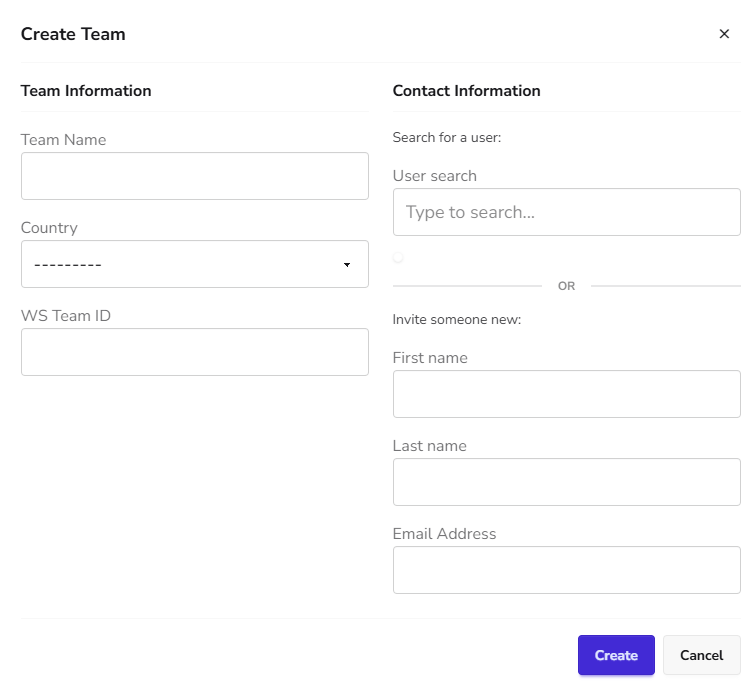
When creating a team you must provide a contact/owner for the team, if the person has an account on the Event Platform that allows connections you can search by name, or provide contact details and they will receive an invitation email to manage the team.
New teams are only available to the event which created them until they have been approved by the kSail team.
Entry Management
An entry can move through the following statuses as follows
Status | Description |
Requested Invitation | The team have asked to enter the event (if Entry Invitations are enabled) |
Invitation Issued | The team have been sent an Invitation to Enter |
Invitation Revoked | The issued Invitation has been revoked by the event |
Waitlist | The team have been placed on a Waiting list (with a specified order/position) |
Entered (awaiting payment) | The team have Entered the event but not paid (this counts towards the maximum number of entries for the event). They will show on the Event Landing Page as Entered. |
Entered (paid) | The team have Entered the event and paid (this counts towards the maximum number of entries for the event). They will show on the Event Landing Page as Entered. |
Withdrawn | The team has Withdrawn from the Event. They will show on the Event Landing Page as Withdrawn. |
To change the status of a team, pick the new status from the Set Status dropdown and then click Apply.
NB it is not possible to have more teams set at Entered than the Max number of Entries. If you need to accept more entries for your event please contact the kSail team.
If your event is configured for full entry management/payment then the status of any payments will be visible and access to the payment page is possible. For more information please see the articles on managing Club Payment Methods and Event Entry Configuration